Turn Horizons into
Strategy with Insights
that Multiply.
Reveal the voice of the customer, then use it to unlock future possibilities to own tomorrow.
Voxpopme captures customer truth on video and turns it into the insights your team needs to shape strategy, validate bold bets, and move markets.
One prompt. Ten video responses. Same day.
Reveal the voice of the customer, then use it to unlock future possibilities to own tomorrow.

Turn customer truth into strategic advantage.
Trusted by teams that put the customer at the center of every decision












Some organizations need undeniable evidence to cut through assumptions. Others need to move faster than the market. And some are making the strategic bets that define what's next. Voxpopme is the throughline — turning evidence into agility, agility into strategy, and strategy into market leadership.

Assumptions make the decisions when evidence is hard to find. Break that pattern by using video-based customer intelligence — so you're not just reporting findings, you're shaping the conversation.
Replace Assumptions
Markets shift. Competitors move. And the window to respond is collapsing. Get rapid, real-time customer signals so you can guide decisions with certainty — and become the advisor your leadership team trusts when speed matters.
See Real-Time Signals
The biggest decisions don't come with guarantees — but they can come with confidence. Bring customers closer to your organization, helping you understand what they truly want and enabling the pioneering bets that define your markets.
Make Pioneering BetsWhether you're discovering what customers really think, revealing reality for the business, formulating strategic direction, or propelling organizational action — you'll have the capability to move from signal to action on a single platform.
Capture authentic customer voices at scale. Video-based conversations surface the emotions and truths that surveys and spreadsheets miss entirely.
AI-powered analysis turns hours of customer conversations into clear themes, strategic direction and actionable patterns.
Interact with all of your insights from a single searchable repository. Connect signals across markets, segments, and timeframes to formulate a direction you can stand behind.
Create compelling showreels, stakeholder-ready reports, and video-backed narratives that move people. The best insights don't just inform decisions — they inspire action.
Evidence loses power when it's buried in slides. Package customer truth in ways that create empathy, build alignment, and drive real action across your organization.
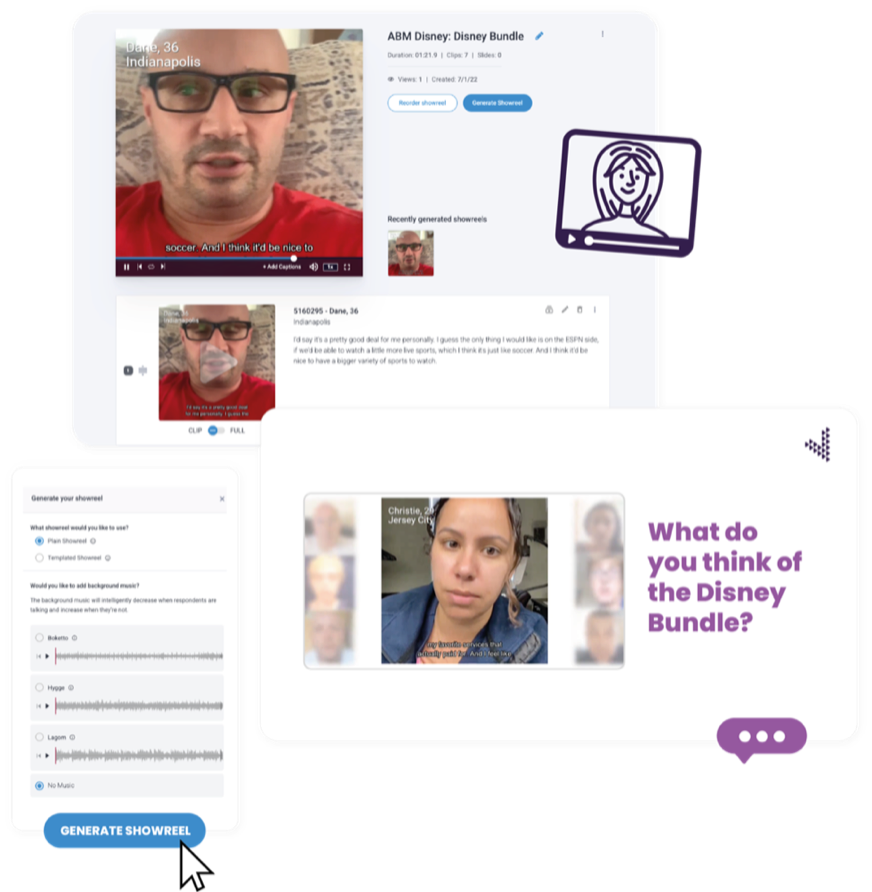
Modern insight teams are under pressure to deliver more strategic value with fewer resources. With AI-powered workflows, intuitive design, and tools that scale with your ambition, you'll spend less time on logistics and more time shaping strategy.
Insights leaders at the world’s most ambitious organizations trust Voxpopme to turn customer truth into strategic advantage.

Romani Patel
Microsoft
“Voxpopme’s platform empowers insights teams, including Microsoft’s, to analyze qualitative data with astonishing speed.”

Raj Sivasubramanian
Airbnb
“When people feel an emotional connection to customers, they are more likely to act. What Voxpopme is doing is the ability to create empathy and inspire action.”

Jacci Weber
Wendy’s
“Voxpopme took inefficient tasks off my plate and allowed me to focus on influencing action through insights.”

Ritu Bhushan
King
“This makes players more than just numbers for the business. While everything we do is driven by data, that helps us storytell more effectively.”
Whether you need undeniable customer evidence, rapid market signals, or confidence in your next big bet.
Achieve itVoxpopme captures authentic customer voices through video — the emotions, motivations, and truths behind their decisions. AI-driven summaries and showreels make it easy to share those signals across the business, building empathy and alignment around what customers actually need.
By giving your team rapid access to real customer signals — themes, sentiment, and key moments surfaced by AI — so you can move from question to confident recommendation in hours, not weeks. Whether you need to react to a market shift or validate a strategic direction, the platform adapts to your pace.
AI runs throughout Voxpopme — transcribing conversations, detecting themes and sentiment, generating summaries and reports, and even conducting voice-led interviews that ask smart follow-up questions. All AI features operate within a secure Microsoft Azure environment, so your data stays private.
Yes. We offer tailored demo sessions and pilot projects so you can see the platform in action — applied to your real business questions, with your target audience, delivering insights you can actually use.
Teams use Voxpopme to validate strategic direction, test messaging and creative, understand brand perception, explore emotional drivers, identify white space opportunities, and build stakeholder alignment — across markets and segments.
Yes. The platform supports studies in 27 countries with access to high-quality respondents across markets. You can capture culturally relevant insights in local languages, using our global panel, your own list, or a custom audience.
Every partnership includes onboarding, training, and ongoing support. For teams that need more, we offer full project delivery, consulting, and strategic advisory services.
By embedding authentic customer voices directly into the numbers. Video responses give context and emotional nuance behind the data — explaining the “why” behind trends. AI analyzes sentiment and themes at scale, and branded showreels bring findings to life for stakeholders.